The northbridge chip cooling fan of the Asus
A8n SLI Deluxe motherboard has always been problematic, noisy
and prone to early failure. I had two fail in the first month of use
in a new computer. Frustrated I replaced the motherboard with the
Premium version with a passive cooling solution. Other than the fan
problem the board was highly rated and performed well for me. Not
wanting the board to go to waste and adding to my clutter I decided
to build a decent computer for my kids. This is what I did to solve
the fan problem.
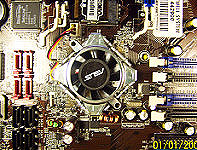
The culprit. A noisy, early failure prone Asus OEM northbdge
chip fan on the A8n SLI Deluxe motherboard. The only major drawback
to an otherwise great board. The board must be taken out of the
case, to snip the fan mount push pin tips off on the underside,
to remove the fan unit.
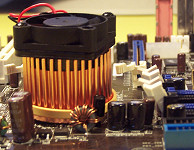
The main concern with replacement fans and heat
sink is size. In this case the footprint was fine and the mounting
holes matched but the height was a concern. Most OEM solutions are
designed low enough for the PCI-E video card to go over the top.
For this Asus board as far as I can tell there were only two good
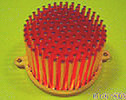
options, this Enzo Tech SNB-R1 Rev A and the Swiftech
MCX159-CU. The Swiftech came with a fan and had a slightly
smaller footprint but cost quite a bit more. With the Enzo Tech
plus a fan, I saved about $10.00 . The advantage with these units
is that the fan can be replaced easily by unscrewing two screws
instead of having to take the motherboard out from the case. It
also appears that the two units can be used without the fan, with
adequate case ventilation, the copper heat sink of both models being
quite substantial.
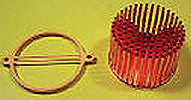
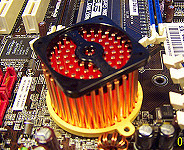
The plastic heat sink mount slides on between the pins from the
top.
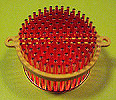
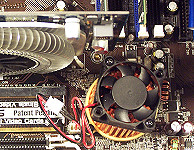
The heat sink with its fan mount.
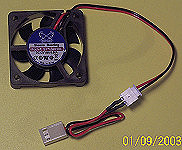
The replacement 40 mm Scythe fan.
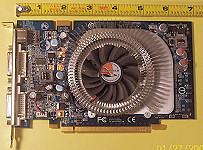
The PCI-E video card I used was the Chaintech
Gefore 8600 GT 256 MB DDR3. I picked it because it's short
(about 7") and cheap ($79.00 plus $30 rebate). Not a card for
gaming enthusiasts but fine for most everyone else.
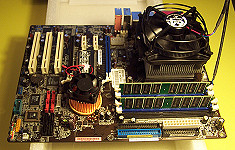
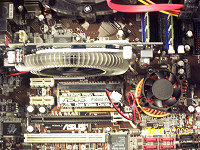
As you can see, the 8600gt at 7" just fits. The newer Ati
4670 should also fit and is a much better performer. Higher performance
cards being longer and fatter will not fit with this heat sink fan.
The Geforce 8800 and 9600 series are 8.5" - 9" long.
I've found that it's tricky to be cost/performance effective rebuilding
old systems with the shadow of diminishing returns looming over
the project with every new component. Savy buyers may find Ebay
and Craigslist helpful.
I ended up paying more than I had wanted ($400+) even with the
socket 939 Athlon 4000 cpu at $43 and Geforce 8600 GT $49.00 (after
rebate) but I did salvage my 939 board and more importantly my kids
are happy with it, listening to music, visiting myface, watching
youtube or playing online games.
It's even possible for one more upgrade if I can find a used socket
939 dual core cpu like a Opteron 185 at a bargain price. I'd also
modify the chipset cooler I have or get a low profile cooler so
a card like a 8800gt would fit.
Prices in May 2008 at Amazon and Newegg
Antec 4480 case + EarthWatt 380 watt power supply $58
AMD Athlon64 4000+ 2.4G 939 $43
Chaintech Geforce 8600 GT 256 MB DDR3 $49.00 (after rebate)
Arctic Cooling Alphine64 cpu fan $9.99
Corsair 2x1GB DDR400 memory module $68
Enzo Tech Heat Sink $16.50
Scythe 40 mm fan $3.99
Masscool 80 mm case fan $1.99
LG DVD Burner $26.99
Seagate 250 GB SATA2 hard drive $59.99
Windows XP Home OEM $79.99
Of course I already had the motherboard and I didn't include shipping
(I always look for free shipping within my parameters).
Total $417.44
Almost all newer motherboards have passive chipset coolers but
there are still a few replacement heat sink and fan coolers available.
The main concerns are whether the mounting holes will match up to
the ones on your motherboard and the price. It's possible to modify
one to fit or fabricate a mounting system for a heat sink and stick
a fan on it or have a case fan blowing air on the heat sink from
the side. Frustrating for me was trying to get extra push pins,
the little plastic securing devices. No one had any and was told
nuts and bolts with rubber washers would work.
Enzotech
Pure Copper Low Profile Heat Sink with Fan SLF-1 Multiple push pin locations for universal mounting
on various board assembly. (hole to hole distance 54.6mm and
59m). Pure copper heat sink. Comes with fan and thermal compound.